
RHEL 10 - LVM
Volumes linéaires avec des volumes physiques différents
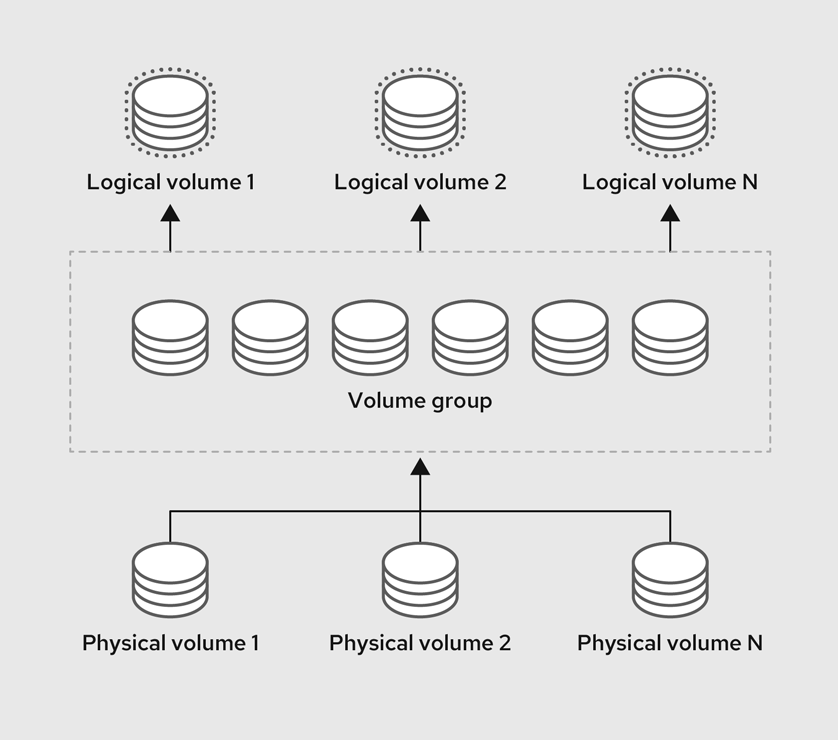
Contexte
- 2 disques de 4Go disponibles immédiatement
- 1 disque de 4Go disponible ultérieurement
Objectifs
- Créer 3 LV de tailles similaires utilisant la totalité de l'espace disponible
- Écriture de données sur les volumes
- Agrandir le VG et un LV de + 4Go après l'ajout du 3ème disque
- Écriture de données sur le LV ainsi agrandit
- Réduire le LV puis le VG augmenté précédemment de 4Go
- Supprimer le 3ème PV
Identifier les disques en présence
lsblkNAME MAJ:MIN RM SIZE RO TYPE MOUNTPOINTS
sda 8:0 0 8G 0 disk
├─sda1 8:1 0 1M 0 part
├─sda2 8:2 0 1G 0 part /boot
└─sda3 8:3 0 7G 0 part
├─rhel-root 253:0 0 6,2G 0 lvm /
└─rhel-swap 253:1 0 820M 0 lvm [SWAP]
sdb 8:16 0 4G 0 disk
sdc 8:32 0 4G 0 disk
sr0 11:0 1 816,4M 0 romOn utilise sdb et sdc dans ce lab
sdb 8:16 0 4G 0 disksdc 8:32 0 4G 0 disk
Il est possible d'utiliser un disque entier ou une partition pour créer un PV, à adapter selon les besoins, ici on utilise les disques entiers
LVM vous permet de créer des volumes physiques en dehors des partitions de disques. Il est généralement recommandé... de créer une partition qui couvre le disque entier afin de l'étiqueter en tant que volume physique LVM
Préparation des disques en présence
fdisk /dev/sdb
Welcome to fdisk (util-linux 2.40.2).
Changes will remain in memory only, until you decide to write them.
Be careful before using the write command.

Command (m for help): g→ GPTn→ New →1→Entr→Entrt→44w
On a créé une table de partition GPT avec une partition n°1 de type LVM Linux sur la totalité de l'espace disponible sur le disque SDB
Cette opération est à réitérer avec SDC
Vérification:
lsblkNAME MAJ:MIN RM SIZE RO TYPE MOUNTPOINTS
sda 8:0 0 8G 0 disk
├─sda1 8:1 0 1M 0 part
├─sda2 8:2 0 1G 0 part /boot
└─sda3 8:3 0 7G 0 part
├─rhel-root 253:0 0 6,2G 0 lvm /
└─rhel-swap 253:1 0 820M 0 lvm [SWAP]
sdb 8:16 0 4G 0 disk
└─sdb1 8:17 0 4G 0 part
sdc 8:32 0 4G 0 disk
└─sdc1 8:33 0 4G 0 part
sr0 11:0 1 816,4M 0 rom└─sdb1 8:17 0 4G 0 part└─sdc1 8:33 0 4G 0 part
fdisk -l /dev/sdb /dev/sdcDisk /dev/sdb: 4 GiB, 4294967296 bytes, 8388608 sectors
Disk model: QEMU HARDDISK
Units: sectors of 1 * 512 = 512 bytes
Sector size (logical/physical): 512 bytes / 512 bytes
I/O size (minimum/optimal): 512 bytes / 512 bytes
Disklabel type: gpt
Disk identifier: 596203E1-1B0A-4A54-98D9-356126125757
Device Start End Sectors Size Type
/dev/sdb1 2048 8386559 8384512 4G Linux LVM
Disk /dev/sdc: 4 GiB, 4294967296 bytes, 8388608 sectors
Disk model: QEMU HARDDISK
Units: sectors of 1 * 512 = 512 bytes
Sector size (logical/physical): 512 bytes / 512 bytes
I/O size (minimum/optimal): 512 bytes / 512 bytes
Disklabel type: gpt
Disk identifier: A02DCC54-CCB2-40EC-A66F-0E9451030AC0
Device Start End Sectors Size Type
/dev/sdc1 2048 8386559 8384512 4G Linux LVM/dev/sdb1 2048 8386559 8384512 4G Linux LVM/dev/sdc1 2048 8386559 8384512 4G Linux LVM
Les 2 disques sont prêts
Création des PV
Le 1er PV doit être créé manuellement, il est possible d'ajouter des volumes ensuite directement avec vgcreate
pvcreate /dev/sdb1 /dev/sdc1 Physical volume "/dev/sdb1" successfully created.
Physical volume "/dev/sdc1" successfully created.On a créé un PV avec /dev/sdb1 et un PV avec /dev/sdc1
Vérification:
pvdisplay /dev/sdb1 /dev/sdc1 "/dev/sdb1" is a new physical volume of "<4,00 GiB"
--- NEW Physical volume ---
PV Name /dev/sdb1
VG Name
PV Size <4,00 GiB
Allocatable NO
PE Size 0
Total PE 0
Free PE 0
Allocated PE 0
PV UUID eUfD11-IWSX-kJjT-TbPa-NrVC-J7px-WySSIq
"/dev/sdc1" is a new physical volume of "<4,00 GiB"
--- NEW Physical volume ---
PV Name /dev/sdc1
VG Name
PV Size <4,00 GiB
Allocatable NO
PE Size 0
Total PE 0
Free PE 0
Allocated PE 0
PV UUID XLkS7B-JqUs-arKl-ryOa-XNpn-k6AT-hTMWnECréation d'un VG
vgcreate Labo1 /dev/sdb1 /dev/sdc1 Volume group "Labo1" successfully createdOn a créé un VG nommé Labo1 avec 2 volumes: sdb1 et sdc1
Vérification:
vgdisplay Labo1 --- Volume group ---
VG Name Labo1
System ID
Format lvm2
Metadata Areas 2
Metadata Sequence No 1
VG Access read/write
VG Status resizable
MAX LV 0
Cur LV 0
Open LV 0
Max PV 0
Cur PV 2
Act PV 2
VG Size 7,99 GiB
PE Size 4,00 MiB
Total PE 2046
Alloc PE / Size 0 / 0
Free PE / Size 2046 / 7,99 GiB
VG UUID 88SjLi-cEyA-ubSR-kbQa-Ti40-Y2K4-Px6BX6Cur PV 2→ 2 PV utilisésAct PV 2→ 2 PV actifs (fonctionnels)VG Size 7,99 GiB→ Taille totale du VG en GoPE Size 4,00 MiB→ Taille des Physical Extension en MoTotal PE 2046→ Nombre total de PE sur le VG- 2046 PE X 4Mo = 7.99Go
Création des LV
lvcreate -n lvlab1 -l 33%VG Labo1 Logical volume "lvlab1" created.on a créé un LV nommé lvlab1 sur le VG Labo1 d'une taille égale à 33% de la taille totale du VG
Vérification:
lvdisplay Labo1/lvlab1 --- Logical volume ---
LV Path /dev/Labo1/lvlab1
LV Name lvlab1
VG Name Labo1
LV UUID eJcaPQ-KGe0-ifjF-g3gp-Z1O4-D0QM-PnE2Ym
LV Write Access read/write
LV Creation host, time localhost.localdomain, 2025-10-08 19:52:20 +0200
LV Status available
# open 0
LV Size <2,64 GiB
Current LE 675
Segments 1
Allocation inherit
Read ahead sectors auto
- currently set to 8192
Block device 253:2LV Path /dev/Labo1/lvlab1→ Correspond au chemin du volumeLV Size <2,64 GiB→ Correspond à la taille du volume
Cette opération est à réitérer pour créer les 2 autres volumes
lvcreate -n lvlab2 -l 33%VG Labo1 Logical volume "lvlab2" created.lvcreate -n lvlab3 -l 33%VG Labo1 Logical volume "lvlab3" created.Schéma de notre configuration
lvdisplay -m Labo1 --- Logical volume ---
LV Path /dev/Labo1/lvlab1
LV Name lvlab1
VG Name Labo1
LV UUID eJcaPQ-KGe0-ifjF-g3gp-Z1O4-D0QM-PnE2Ym
LV Write Access read/write
LV Creation host, time localhost.localdomain, 2025-10-08 19:52:20 +0200
LV Status available
# open 0
LV Size <2,64 GiB
Current LE 675
Segments 1
Allocation inherit
Read ahead sectors auto
- currently set to 8192
Block device 253:2
--- Segments ---
Logical extents 0 to 674:
Type linear
Physical volume /dev/sdb1
Physical extents 0 to 674
--- Logical volume ---
LV Path /dev/Labo1/lvlab2
LV Name lvlab2
VG Name Labo1
LV UUID EjViku-czlp-sbU5-HPHI-sxAF-pfnn-BEub5x
LV Write Access read/write
LV Creation host, time localhost.localdomain, 2025-10-08 19:53:48 +0200
LV Status available
# open 0
LV Size <2,64 GiB
Current LE 675
Segments 1
Allocation inherit
Read ahead sectors auto
- currently set to 8192
Block device 253:3
--- Segments ---
Logical extents 0 to 674:
Type linear
Physical volume /dev/sdc1
Physical extents 0 to 674
--- Logical volume ---
LV Path /dev/Labo1/lvlab3
LV Name lvlab3
VG Name Labo1
LV UUID Y1D6H9-wZYA-xlay-w4lk-WDWj-5AEu-nPK5zc
LV Write Access read/write
LV Creation host, time localhost.localdomain, 2025-10-08 19:59:35 +0200
LV Status available
# open 0
LV Size <2,64 GiB
Current LE 675
Segments 2
Allocation inherit
Read ahead sectors auto
- currently set to 8192
Block device 253:4
--- Segments ---
Logical extents 0 to 347:
Type linear
Physical volume /dev/sdb1
Physical extents 675 to 1022
Logical extents 348 to 674:
Type linear
Physical volume /dev/sdc1
Physical extents 675 to 1001Avec lsblk:
lsblk -fsdb
└─sdb1 LVM2_member LVM2 001
├─Labo1-lvlab1
│
└─Labo1-lvlab3
sdc
└─sdc1 LVM2_member LVM2 001
├─Labo1-lvlab2
│
└─Labo1-lvlab3Utilisation des volumes créés
Création des partitions sur les LV
On créé une partition ext4 par LV dans ce lab, à adapté selon les besoin
mkfs.ext4 /dev/Labo1/lvlab1mke2fs 1.47.1 (20-May-2024)
Rejet des blocs de périphérique : complété
En train de créer un système de fichiers avec 691200 4k blocs et 172832 i-noeuds.
UUID de système de fichiers=52fade9c-603f-4882-a81e-ebbf4ce8a8db
Superblocs de secours stockés sur les blocs :
32768, 98304, 163840, 229376, 294912
Allocation des tables de groupe : complété
Écriture des tables d'i-noeuds : complété
Création du journal (16384 blocs) : complété
Écriture des superblocs et de l'information de comptabilité du système de
fichiers : complétéRépéter cette opération pour lvlab2 et lvlab3
Monter les LV sur le système
- Création des points de montage
mkdir /mnt/lvlab1 /mnt/lvlab2 /mnt/lvlab3- Montage des partitions
mount /dev/Labo1/lvlab1 /mnt/lvlab1
mount /dev/Labo1/lvlab2 /mnt/lvlab2
mount /dev/Labo1/lvlab3 /mnt/lvlab3Vérification:
df | grep mnt/dev/mapper/Labo1-lvlab1 2647744 24 2493096 1% /mnt/lvlab1
/dev/mapper/Labo1-lvlab2 2647744 24 2493096 1% /mnt/lvlab2
/dev/mapper/Labo1-lvlab3 2647744 24 2493096 1% /mnt/lvlab3Pour le lab on va créer des fichiers inutiles de tailles diverses
Un fichier de 500Mo sur /mnt/lvlab1
dd if=/dev/urandom of=/mnt/lvlab1/fichier_500mo bs=1M count=500 status=progress421527552 octets (422 MB, 402 MiB) copiés, 1 s, 421 MB/s
500+0 enregistrements lus
500+0 enregistrements écrits
524288000 octets (524 MB, 500 MiB) copiés, 1,24566 s, 421 MB/sUn fichier de 1Go sur /mnt/lvlab2
dd if=/dev/urandom of=/mnt/lvlab2/fichier_1Go bs=1M count=1000 status=progress844103680 octets (844 MB, 805 MiB) copiés, 2 s, 422 MB/s
1000+0 enregistrements lus
1000+0 enregistrements écrits
1048576000 octets (1,0 GB, 1000 MiB) copiés, 2,48142 s, 423 MB/sUn fichier de 1.5Go sur /mnt/lvlab3
dd if=/dev/urandom of=/mnt/lvlab3/fichier_1_5Go bs=1M count=1500 status=progress1284505600 octets (1,3 GB, 1,2 GiB) copiés, 3 s, 428 MB/s
1500+0 enregistrements lus
1500+0 enregistrements écrits
1572864000 octets (1,6 GB, 1,5 GiB) copiés, 3,67833 s, 428 MB/sVérifications:
tree -h /mnt[ 48] /mnt
├── [ 4.0K] lvlab1
│ ├── [ 500M] fichier_500mo
│ └── [ 16K] lost+found
├── [ 4.0K] lvlab2
│ ├── [1000M] fichier_1Go
│ └── [ 16K] lost+found
└── [ 4.0K] lvlab3
├── [ 1.5G] fichier_1_5Go
└── [ 16K] lost+found
7 directories, 3 filesAjout d'un PV au VG Labo1
On a ajouté un disque (sdd) de 4Go à notre serveur
lsblkNAME MAJ:MIN RM SIZE RO TYPE MOUNTPOINTS
sda 8:0 0 8G 0 disk
├─sda1 8:1 0 1M 0 part
├─sda2 8:2 0 1G 0 part /boot
└─sda3 8:3 0 7G 0 part
├─rhel-root 253:0 0 6,2G 0 lvm /
└─rhel-swap 253:1 0 820M 0 lvm [SWAP]
sdb 8:16 0 4G 0 disk
└─sdb1 8:17 0 4G 0 part
├─Labo1-lvlab1 253:2 0 2,6G 0 lvm
└─Labo1-lvlab3 253:4 0 2,6G 0 lvm
sdc 8:32 0 4G 0 disk
└─sdc1 8:33 0 4G 0 part
├─Labo1-lvlab2 253:3 0 2,6G 0 lvm
└─Labo1-lvlab3 253:4 0 2,6G 0 lvm
sdd 8:48 0 4G 0 disk
sr0 11:0 1 816,4M 0 romsdd 8:48 0 4G 0 disk
fdisk /dev/sddWelcome to fdisk (util-linux 2.40.2).
Changes will remain in memory only, until you decide to write them.
Be careful before using the write command.
Device does not contain a recognized partition table.
Created a new DOS (MBR) disklabel with disk identifier 0xfab51399.
Command (m for help): g→ GPTn→ New →1→Entr→Entrt→44w
On a créé une table de partition GPT avec une partition n°1 de type LVM Linux sur la totalité de l'espace disponible sur le disque SDD
Vérification:
fdisk -l /dev/sddDisk /dev/sdd: 4 GiB, 4294967296 bytes, 8388608 sectors
Disk model: QEMU HARDDISK
Units: sectors of 1 * 512 = 512 bytes
Sector size (logical/physical): 512 bytes / 512 bytes
I/O size (minimum/optimal): 512 bytes / 512 bytes
Disklabel type: gpt
Disk identifier: C10DA1EF-0145-430C-A96A-E88A7ECC9D62
Device Start End Sectors Size Type
/dev/sdd1 2048 8386559 8384512 4G Linux LVMAjout de SDD1 au VG Labo1
vgextend Labo1 /dev/sdd1 Physical volume "/dev/sdd1" successfully created.
Volume group "Labo1" successfully extendedVérification:
vgdisplay Labo1 --- Volume group ---
VG Name Labo1
System ID
Format lvm2
Metadata Areas 3
Metadata Sequence No 11
VG Access read/write
VG Status resizable
MAX LV 0
Cur LV 3
Open LV 0
Max PV 0
Cur PV 3
Act PV 3
VG Size <11,99 GiB
PE Size 4,00 MiB
Total PE 3069
Alloc PE / Size 2025 / 7,91 GiB
Free PE / Size 1044 / <4,08 GiB
VG UUID efcT72-pOkM-7ogu-1moq-9v31-dqkK-CdHW7lCur PV 3→ 3 disquesVG Size <11,99 GiB→ Nouvelle taille totale du VGFree PE / Size 1044 / <4,08 GiB→ Espace disponible
Agrandir le LV lvlab3 avec l'espace nouvellement disponible sur le VG Labo1
Afin d'utiliser la taille maximale d'espace disponible, dans ce lab on va définir la valeur en PE, il est possible de déterminer cette valeur en Go ou en %
À l'intérieur d'un groupe de volumes, l'espace disque disponible pour l'allocation est divisé en des unités de taille fixe appelées des extensions. Une extension est la plus petite unité d'espace pouvant être allouée.
lvresize -l +1044 Labo1/lvlab3 Size of logical volume Labo1/lvlab3 changed from <2,64 GiB (675 extents) to 6,71 GiB (1719 extents).
Logical volume Labo1/lvlab3 successfully resized.Vérifications:
lvdisplay -m Labo1/lvlab3 --- Logical volume ---
LV Path /dev/Labo1/lvlab3
LV Name lvlab3
VG Name Labo1
LV UUID xf4nss-xMAP-BRe5-8EJU-FaXp-gby5-RqoGh8
LV Write Access read/write
LV Creation host, time localhost.localdomain, 2025-10-09 08:16:45 +0200
LV Status available
# open 1
LV Size 6,71 GiB
Current LE 1719
Segments 3
Allocation inherit
Read ahead sectors auto
- currently set to 8192
Block device 253:4
--- Segments ---
Logical extents 0 to 347:
Type linear
Physical volume /dev/sdb1
Physical extents 675 to 1022
Logical extents 348 to 695:
Type linear
Physical volume /dev/sdc1
Physical extents 675 to 1022
Logical extents 696 to 1718:
Type linear
Physical volume /dev/sdd1
Physical extents 0 to 1022LV Size 6,71 GiB→ Nouvelle taille du LV
A ce stade, seul le LV à été agrandi, pas la partition donc l'espace supplémentaire n'est pas encore utilisable
Agrandir le FS de lvlab3
- On démonte le volume lvlab3
umount /mnt/lvlab3- On redimensionne la partition en utilisant la totalité de l'espace disponible sur le volume
e2fsck -f /dev/Labo1/lvlab3e2fsck 1.47.1 (20-May-2024)
Passe 1 : vérification des i-noeuds, des blocs et des tailles
Passe 2 : vérification de la structure des répertoires
Passe 3 : vérification de la connectivité des répertoires
Passe 4 : vérification des compteurs de référence
Passe 5 : vérification de l'information du sommaire de groupe
/dev/Labo1/lvlab3 : 12/172832 fichiers (0.0% non contigus), 413271/691200 blocsresize2fs /dev/Labo1/lvlab3resize2fs 1.47.1 (20-May-2024)
En train de redimensionner le système de fichiers sur /dev/Labo1/lvlab3 à 1760256 (4k) blocs.
Le système de fichiers sur /dev/Labo1/lvlab3 a maintenant une taille de 1760256 blocs (4k).Il est possible de définir une taille précise avec resize2fs: resize2fs -p /dev/Labo1/lvlab3 *G
- On remonte le volume
mount /dev/Labo1/lvlab3 /mnt/lvlab3Verification:
df -h | grep mnt/dev/mapper/Labo1-lvlab1 2,6G 501M 1,9G 21% /mnt/lvlab1
/dev/mapper/Labo1-lvlab2 2,6G 1001M 1,5G 42% /mnt/lvlab2
/dev/mapper/Labo1-lvlab3 6,6G 1,5G 4,8G 24% /mnt/lvlab3/dev/mapper/Labo1-lvlab3 6,6G 1,5G 4,8G 24% /mnt/lvlab3→ Nouvelle taille du volume = 6.6Go
- Test d'écriture sur le volume
On écrit un fichier de 500Mo sur /mnt/lvlab3
dd if=/dev/urandom of=/mnt/lvlab3/fichier_500mo bs=1M count=500 status=progress421527552 octets (422 MB, 402 MiB) copiés, 1 s, 421 MB/s
500+0 enregistrements lus
500+0 enregistrements écrits
524288000 octets (524 MB, 500 MiB) copiés, 1,24561 s, 421 MB/sls -lh /mnt/lvlab3total 2,0G
-rw-r--r--. 1 root root 1,5G 9 oct. 09:07 fichier_1_5Go
-rw-r--r--. 1 root root 500M 9 oct. 09:59 fichier_500mo
drwx------. 2 root root 16K 9 oct. 08:47 lost+foundSupprimer le PV SDD1
On supprime le fichier de 1.5Go créé précédemment pour diminuer l'espace occupé par le LV lvlab3
rm -f /mnt/lvlab3/fichier_1_5GoIl faut impérativement réduire le FS avant pour éviter la corruption / perte de données
- On démonte le volume lvlab3
umount /dev/Labo1/lvlab3- On vérifie l'intégrité du volume
e2fsck -f /dev/Labo1/lvlab3e2fsck 1.47.1 (20-May-2024)
Passe 1 : vérification des i-noeuds, des blocs et des tailles
Passe 2 : vérification de la structure des répertoires
Passe 3 : vérification de la connectivité des répertoires
Passe 4 : vérification des compteurs de référence
Passe 5 : vérification de l'information du sommaire de groupe
/dev/Labo1/lvlab3 : 12/440640 fichiers (0.0% non contigus), 179788/1760256 blocs- On réduit le FS de /dev/Labo1/lvlab3 à la taille minimum possible
resize2fs -M /dev/Labo1/lvlab3resize2fs 1.47.1 (20-May-2024)
En train de redimensionner le système de fichiers sur /dev/Labo1/lvlab3 à 257851 (4k) blocs.
Le système de fichiers sur /dev/Labo1/lvlab3 a maintenant une taille de 257851 blocs (4k).- On redimensionne le LV lvlab3 en supprimant une valeur minimum égale à la taille de sdd1
pvdisplay /dev/sdd1 --- Physical volume ---
PV Name /dev/sdd1
VG Name Labo1
PV Size <4,00 GiB / not usable 2,00 MiB
Allocatable yes (but full)
PE Size 4,00 MiB
Total PE 1023
Free PE 0
Allocated PE 1023
PV UUID jlnhwZ-fKP4-AUuF-tWtQ-JWp2-S0eD-2dnJM0fdisk -l /dev/Labo1/lvlab3Disk /dev/Labo1/lvlab3: 6,71 GiB, 7210008576 bytes, 14082048 sectors
Units: sectors of 1 * 512 = 512 bytes
Sector size (logical/physical): 512 bytes / 512 bytes
I/O size (minimum/optimal): 512 bytes / 512 bytes/dev/Labo1/lvlab3: 6,71 GiB moins PV Size <4,00 GiB → on redimenssione à 2Go pour prendre une marge
lvresize -L 2G Labo1/lvlab3 File system ext4 found on Labo1/lvlab3.
File system size (1007,23 MiB) is smaller than the requested size (2,00 GiB).
File system reduce is not needed, skipping.
Size of logical volume Labo1/lvlab3 changed from 6,71 GiB (1719 extents) to 2,00 GiB (512 extents).
Logical volume Labo1/lvlab3 successfully resized.- On déplace les données éventuellement présentes sur /dev/sdd1 vers le autres PV
pvmove /dev/sdd1 /dev/sdd1: Moved: 1,17%
/dev/sdd1: Moved: 67,97%
/dev/sdd1: Moved: 100,00%- On retire le PV sdd1 du VG Labo1
vgreduce Labo1 /dev/sdd1 Removed "/dev/sdd1" from volume group "Labo1"- On supprime le PV sdd1
pvremove /dev/sdd1 Labels on physical volume "/dev/sdd1" successfully wiped.- Réassigner l'espace disponible restant sur le VG Labo1 au LV lvlab3
lvresize -l +100%FREE Labo1/lvlab3 Size of logical volume Labo1/lvlab3 changed from 2,00 GiB (512 extents) to <2,72 GiB (696 extents).
Logical volume Labo1/lvlab3 successfully resized.resize2fs /dev/Labo1/lvlab3resize2fs 1.47.1 (20-May-2024)
En train de redimensionner le système de fichiers sur /dev/Labo1/lvlab3 à 524288 (4k) blocs.
Le système de fichiers sur /dev/Labo1/lvlab3 a maintenant une taille de 524288 blocs (4k).Vérification:
vgdisplay Labo1 --- Volume group ---
VG Name Labo1
System ID
Format lvm2
Metadata Areas 2
Metadata Sequence No 40
VG Access read/write
VG Status resizable
MAX LV 0
Cur LV 3
Open LV 2
Max PV 0
Cur PV 2
Act PV 2
VG Size 7,99 GiB
PE Size 4,00 MiB
Total PE 2046
Alloc PE / Size 2046 / 7,99 GiB
Free PE / Size 0 / 0
VG UUID efcT72-pOkM-7ogu-1moq-9v31-dqkK-CdHW7lFree PE / Size 0 / 0 → On utilise bien la totalité de l'espace du VG
Résumé des commandes essentielles d'informations sur l'état du système LVM
Pour les PV (Physical Volumes)
pvs ou pvscan → liste d'informations minimales
pvs PV VG Fmt Attr PSize PFree
/dev/sda3 rhel lvm2 a-- <7,00g 0
/dev/sdb1 Labo1 lvm2 a-- <4,00g 0
/dev/sdc1 Labo1 lvm2 a-- <4,00g 0pvscan PV /dev/sda3 VG rhel lvm2 [<7,00 GiB / 0 free]
PV /dev/sdb1 VG Labo1 lvm2 [<4,00 GiB / 0 free]
PV /dev/sdc1 VG Labo1 lvm2 [<4,00 GiB / 0 free]
Total: 3 [<14,99 GiB] / in use: 3 [<14,99 GiB] / in no VG: 0 [0 ]pvdisplay → liste d'informations détaillées avec nombreuses options → --help
pvdisplay -m --- Physical volume ---
PV Name /dev/sda3
VG Name rhel
PV Size <7,00 GiB / not usable 0
Allocatable yes (but full)
PE Size 4,00 MiB
Total PE 1791
Free PE 0
Allocated PE 1791
PV UUID tY3mNB-EC41-oCzl-fb8Q-A5T9-vOZG-lFPWFT
--- Physical Segments ---
Physical extent 0 to 204:
Logical volume /dev/rhel/swap
Logical extents 0 to 204
Physical extent 205 to 1790:
Logical volume /dev/rhel/root
Logical extents 0 to 1585
--- Physical volume ---
PV Name /dev/sdb1
VG Name Labo1
PV Size <4,00 GiB / not usable 2,00 MiB
Allocatable yes (but full)
PE Size 4,00 MiB
Total PE 1023
Free PE 0
Allocated PE 1023
PV UUID l6Gmss-Owp1-pXyn-M3SI-UHPE-vfgJ-cze7Qv
--- Physical Segments ---
Physical extent 0 to 674:
Logical volume /dev/Labo1/lvlab1
Logical extents 0 to 674
Physical extent 675 to 1022:
Logical volume /dev/Labo1/lvlab3
Logical extents 0 to 347
--- Physical volume ---
PV Name /dev/sdc1
VG Name Labo1
PV Size <4,00 GiB / not usable 2,00 MiB
Allocatable yes (but full)
PE Size 4,00 MiB
Total PE 1023
Free PE 0
Allocated PE 1023
PV UUID 6ATdzz-3dSW-dYPs-1meV-1GF0-PRDy-Jqmkvn
--- Physical Segments ---
Physical extent 0 to 674:
Logical volume /dev/Labo1/lvlab2
Logical extents 0 to 674
Physical extent 675 to 1022:
Logical volume /dev/Labo1/lvlab3
Logical extents 348 to 695Pour les VG (Volume Groups)
vgs ou vgscan → liste d'informations minimales
vgs VG #PV #LV #SN Attr VSize VFree
Labo1 2 3 0 wz--n- 7,99g 0
rhel 1 2 0 wz--n- <7,00g 0 vgscan Found volume group "rhel" using metadata type lvm2
Found volume group "Labo1" using metadata type lvm2vgdisplay Labo1 → liste d'informations détaillées avec nombreuses options → --help
vgdisplay -v Labo1 --- Volume group ---
VG Name Labo1
System ID
Format lvm2
Metadata Areas 2
Metadata Sequence No 40
VG Access read/write
VG Status resizable
MAX LV 0
Cur LV 3
Open LV 0
Max PV 0
Cur PV 2
Act PV 2
VG Size 7,99 GiB
PE Size 4,00 MiB
Total PE 2046
Alloc PE / Size 2046 / 7,99 GiB
Free PE / Size 0 / 0
VG UUID efcT72-pOkM-7ogu-1moq-9v31-dqkK-CdHW7l
  --- Logical volume ---
  LV Path                /dev/Labo1/lvlab1
  LV Name                lvlab1
  VG Name                Labo1
  LV UUID                eJcaPQ-KGe0-ifjF-g3gp-Z1O4-D0QM-PnE2Ym
  LV Write Access        read/write
  LV Creation host, time localhost.localdomain, 2025-10-08 19:52:20 +0200
  LV Status              available
  # open                 0
  LV Size                <2,64 GiB
  Current LE             675
  Segments               1
  Allocation             inherit
  Read ahead sectors     auto
  - currently set to     8192
  Block device           253:2
--- Logical volume ---
LV Path /dev/Labo1/lvlab2
LV Name lvlab2
VG Name Labo1
LV UUID EjViku-czlp-sbU5-HPHI-sxAF-pfnn-BEub5x
LV Write Access read/write
LV Creation host, time localhost.localdomain, 2025-10-08 19:53:48 +0200
LV Status available
# open 0
LV Size <2,64 GiB
Current LE 675
Segments 1
Allocation inherit
Read ahead sectors auto
- currently set to 8192
Block device 253:3
--- Logical volume ---
LV Path /dev/Labo1/lvlab3
LV Name lvlab3
VG Name Labo1
LV UUID raexd0-orre-FvbT-9MOx-LUpd-XQ7h-rfhfrb
LV Write Access read/write
LV Creation host, time localhost.localdomain, 2025-10-09 11:25:34 +0200
LV Status available
# open 0
LV Size <2,72 GiB
Current LE 696
Segments 2
Allocation inherit
Read ahead sectors auto
- currently set to 8192
Block device 253:4
--- Physical volumes ---
PV Name /dev/sdb1
PV UUID l6Gmss-Owp1-pXyn-M3SI-UHPE-vfgJ-cze7Qv
PV Status allocatable
Total PE / Free PE 1023 / 0
PV Name /dev/sdc1
PV UUID 6ATdzz-3dSW-dYPs-1meV-1GF0-PRDy-Jqmkvn
PV Status allocatable
Total PE / Free PE 1023 / 0
Pour les LV (Logical Volume)
lvs ou lvscan → liste d'informations minimales
lvs LV VG Attr LSize Pool Origin Data% Meta% Move Log Cpy%Sync Convert
lvlab1 Labo1 -wi-a----- <2,64g
lvlab2 Labo1 -wi-a----- <2,64g
lvlab3 Labo1 -wi-a----- <2,72g
root rhel -wi-ao---- <6,20g
swap rhel -wi-ao---- 820,00mlvscan ACTIVE '/dev/rhel/swap' [820,00 MiB] inherit
ACTIVE '/dev/rhel/root' [<6,20 GiB] inherit
ACTIVE '/dev/Labo1/lvlab1' [<2,64 GiB] inherit
ACTIVE '/dev/Labo1/lvlab2' [<2,64 GiB] inherit
ACTIVE '/dev/Labo1/lvlab3' [<2,72 GiB] inheritlvdisplay → liste d'informations détaillées avec nombreuses options → --help
lvdisplay -m Labo1 --- Logical volume ---
LV Path /dev/Labo1/lvlab1
LV Name lvlab1
VG Name Labo1
LV UUID eJcaPQ-KGe0-ifjF-g3gp-Z1O4-D0QM-PnE2Ym
LV Write Access read/write
LV Creation host, time localhost.localdomain, 2025-10-08 19:52:20 +0200
LV Status available
# open 0
LV Size <2,64 GiB
Current LE 675
Segments 1
Allocation inherit
Read ahead sectors auto
- currently set to 8192
Block device 253:2
--- Segments ---
Logical extents 0 to 674:
Type linear
Physical volume /dev/sdb1
Physical extents 0 to 674
--- Logical volume ---
LV Path /dev/Labo1/lvlab2
LV Name lvlab2
VG Name Labo1
LV UUID EjViku-czlp-sbU5-HPHI-sxAF-pfnn-BEub5x
LV Write Access read/write
LV Creation host, time localhost.localdomain, 2025-10-08 19:53:48 +0200
LV Status available
# open 0
LV Size <2,64 GiB
Current LE 675
Segments 1
Allocation inherit
Read ahead sectors auto
- currently set to 8192
Block device 253:3
--- Segments ---
Logical extents 0 to 674:
Type linear
Physical volume /dev/sdc1
Physical extents 0 to 674
--- Logical volume ---
LV Path /dev/Labo1/lvlab3
LV Name lvlab3
VG Name Labo1
LV UUID raexd0-orre-FvbT-9MOx-LUpd-XQ7h-rfhfrb
LV Write Access read/write
LV Creation host, time localhost.localdomain, 2025-10-09 11:25:34 +0200
LV Status available
# open 0
LV Size <2,72 GiB
Current LE 696
Segments 2
Allocation inherit
Read ahead sectors auto
- currently set to 8192
Block device 253:4
--- Segments ---
Logical extents 0 to 347:
Type linear
Physical volume /dev/sdb1
Physical extents 675 to 1022
Logical extents 348 to 695:
Type linear
Physical volume /dev/sdc1
Physical extents 675 to 102Sources principales:
- Doc Red Hat
man lvm